Browse EtherNet/IP devices on your Mac.
No Parallels. No Windows.
The only native macOS app that does EtherNet/IP CIP browsing, implicit and explicit messaging, device discovery, tag read/write, with full connection management. No VMs, no CLI wrestling.
Screenshots
See it in action
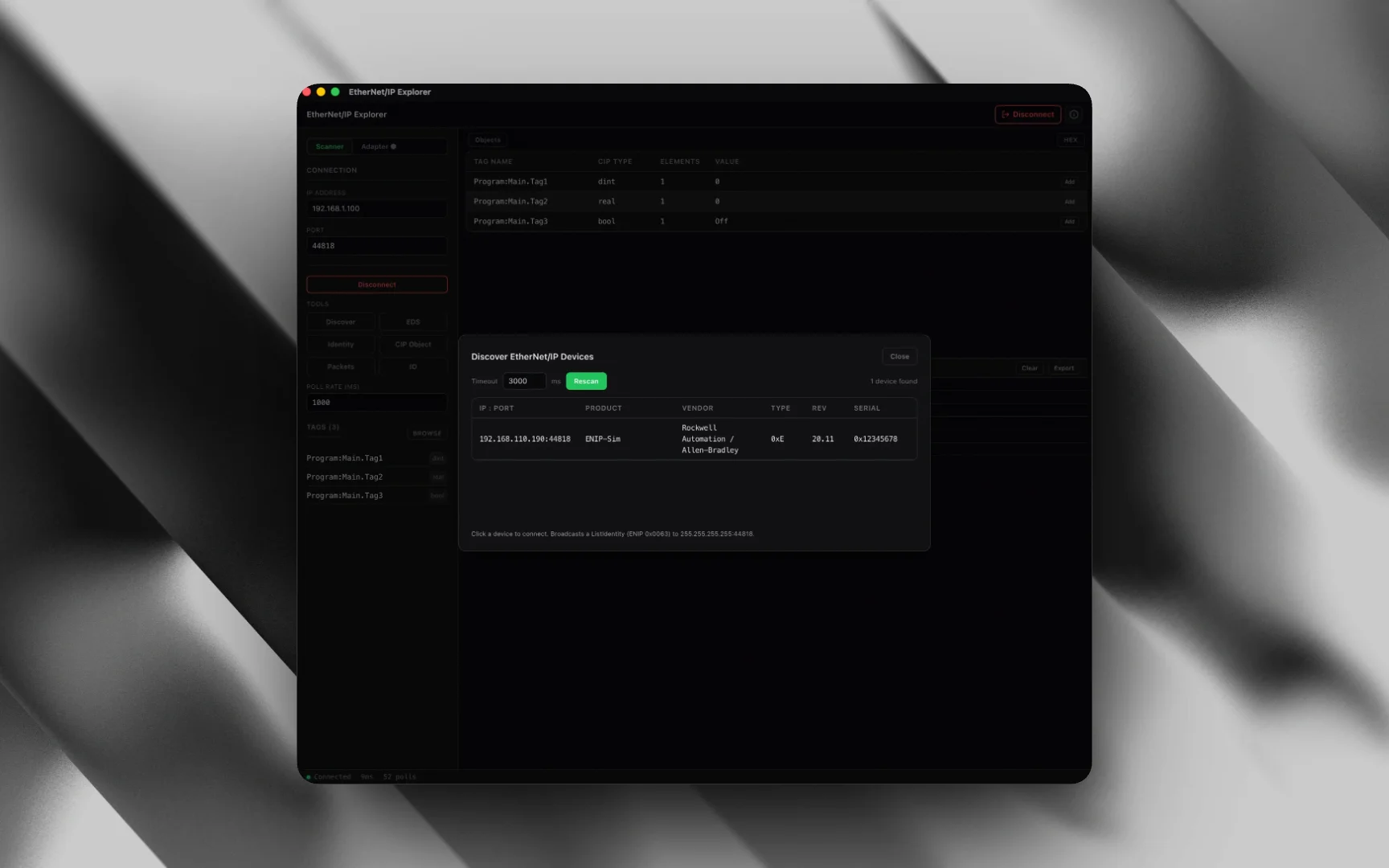
Device Explorer: connect to any EtherNet/IP device and browse the full CIP object tree, identity, classes, instances, and attributes in one native macOS window.
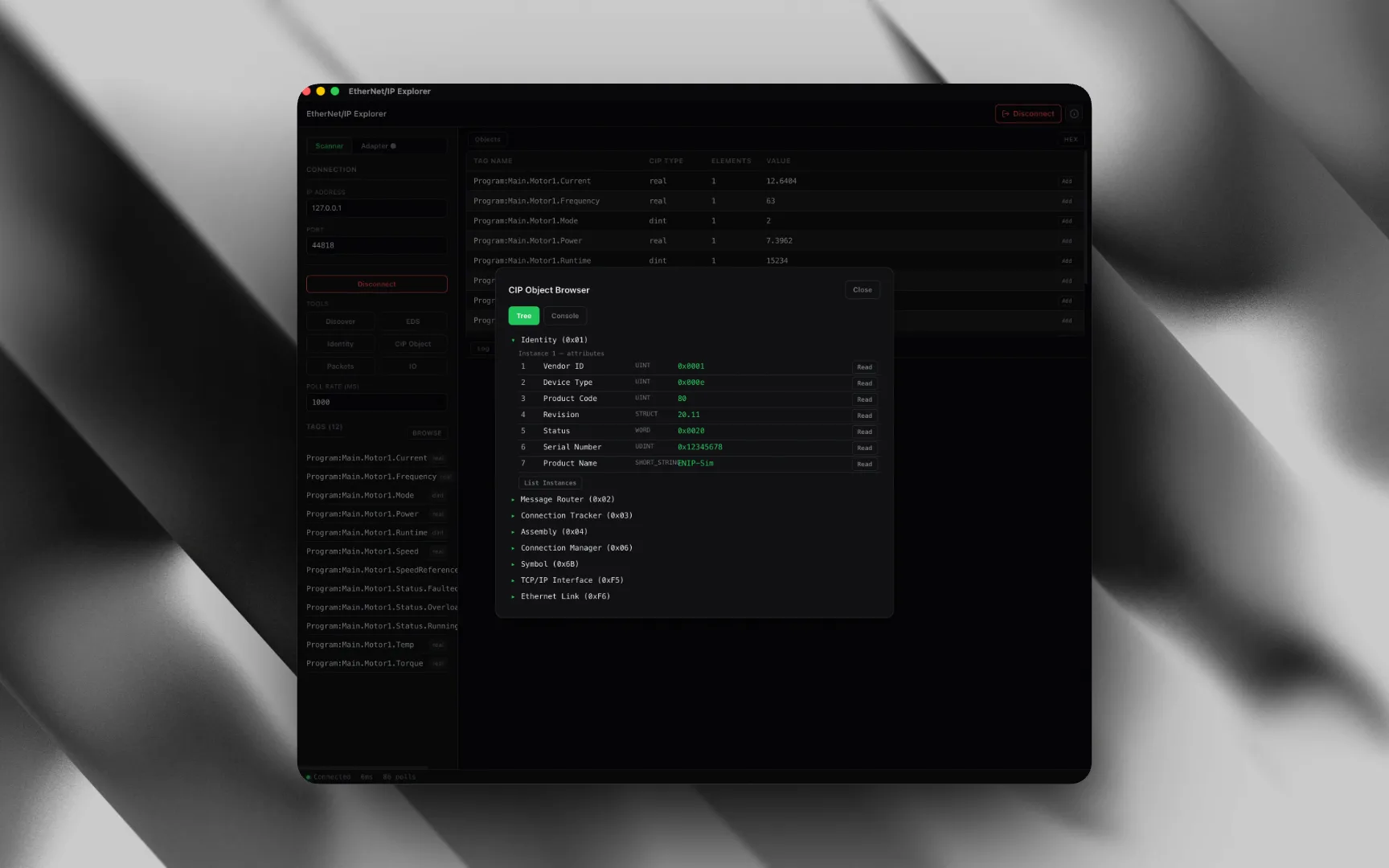
CIP tag browser: navigate the object hierarchy of any EtherNet/IP device. Browse classes, instances, and attributes.
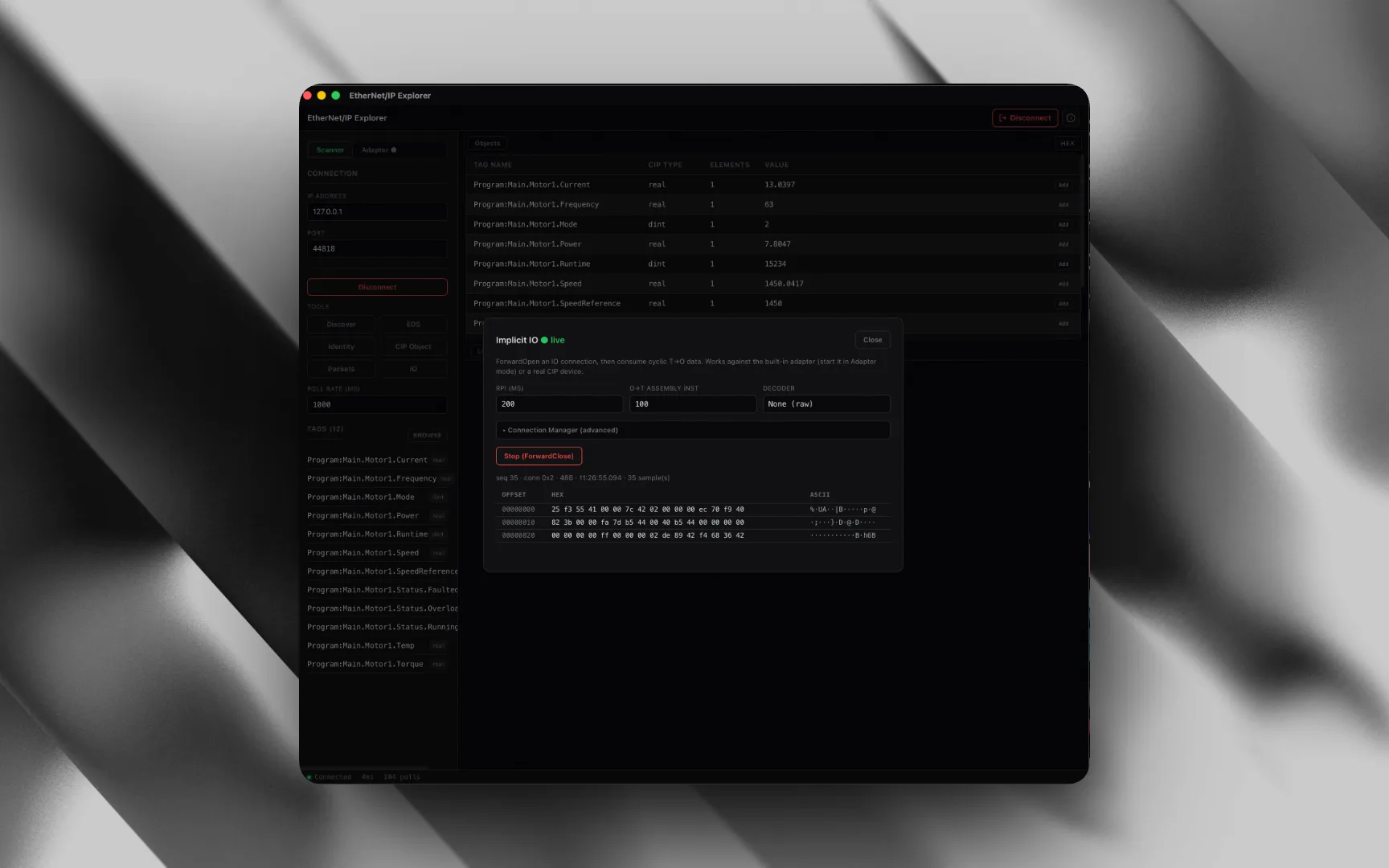
Implicit messaging: real-time I/O data exchange with Forward Open connections and cyclic data monitoring.
Attribute read/write: read and write CIP attributes for any object class, including assembly instances and connection manager parameters.
01: The Problem
You're running Windows VMs just to browse a CIP device.
Every EtherNet/IP tool worth using (RSLinx, FactoryTalk, EIP Scanner) is built for Windows. macOS users are stuck paying for Parallels ($100/yr) on top of the Windows tool ($500+), or wrestling with command-line tools that have no GUI.
Parallels + Windows Tax
Mac users pay $600+ in year one for Parallels Desktop ($100/yr) + RSLinx/FactoryTalk ($500+), just to read a CIP attribute on a Mac.
No Native EtherNet/IP Tool
There is no native macOS EtherNet/IP browser. The only options are Windows-only Rockwell tools, Java apps, or CLI utilities with no GUI for device browsing.
Java/Electron Bloat
The few cross-platform EtherNet/IP tools require Java runtimes or Electron. Heavy, slow, and crash-prone on Apple Silicon. Not how a pro tool should feel.
CLI-Only Tools
opENer, cpppo: powerful but command-line only. No GUI for browsing CIP objects, no attribute editor, no connection manager. You're parsing hex output manually.
02: Features
Everything you need. Nothing you don't.
A native EtherNet/IP Explorer that covers implicit and explicit messaging, CIP tag browsing, device discovery, and full connection management, plus live trend charts, EDS import, a raw packet logger, and a built-in adapter simulator. No subscriptions. No Electron. No Java.
Device Discovery
Automatically discover EtherNet/IP devices on your network. See device identity, vendor ID, product name, serial number, and firmware revision in seconds.
CIP Tag Browser
Navigate the complete CIP object hierarchy of any device. Browse classes, instances, and attributes in a tree view. Supports standard CIP objects and vendor-specific extensions.
Implicit (I/O) Messaging
Establish Forward Open connections for real-time cyclic data exchange. Configure T->O and O->T connection parameters, request/reply sizes, and connection timeouts.
Explicit Messaging
Send unconnected explicit messages to read and write CIP attributes on demand. Access any object class, instance, and attribute with full parameter control.
Assembly Instances
Read and write assembly instances for I/O data exchange. View assembly data in hex, decimal, or binary. Configure input and output assemblies for your device.
Attribute Read/Write
Read and write attributes for any CIP object: Identity, Message Router, Connection Manager, Assembly, and vendor-specific classes. Support for all CIP data types.
Forward Open/Close
Full Forward Open and Forward Close connection management. Configure connection parameters, monitor connection states, and manage multiple simultaneous CIP connections.
Connection Manager
Configure and manage CIP connections through the Connection Manager. Set up explicit and implicit connections, configure priority, timeout multipliers, and transport classes.
Communication Logging
Full request/response logging with millisecond timestamps. Debug timing issues, malformed CIP packets, and timeout problems. Export logs for analysis.
Trend Charts
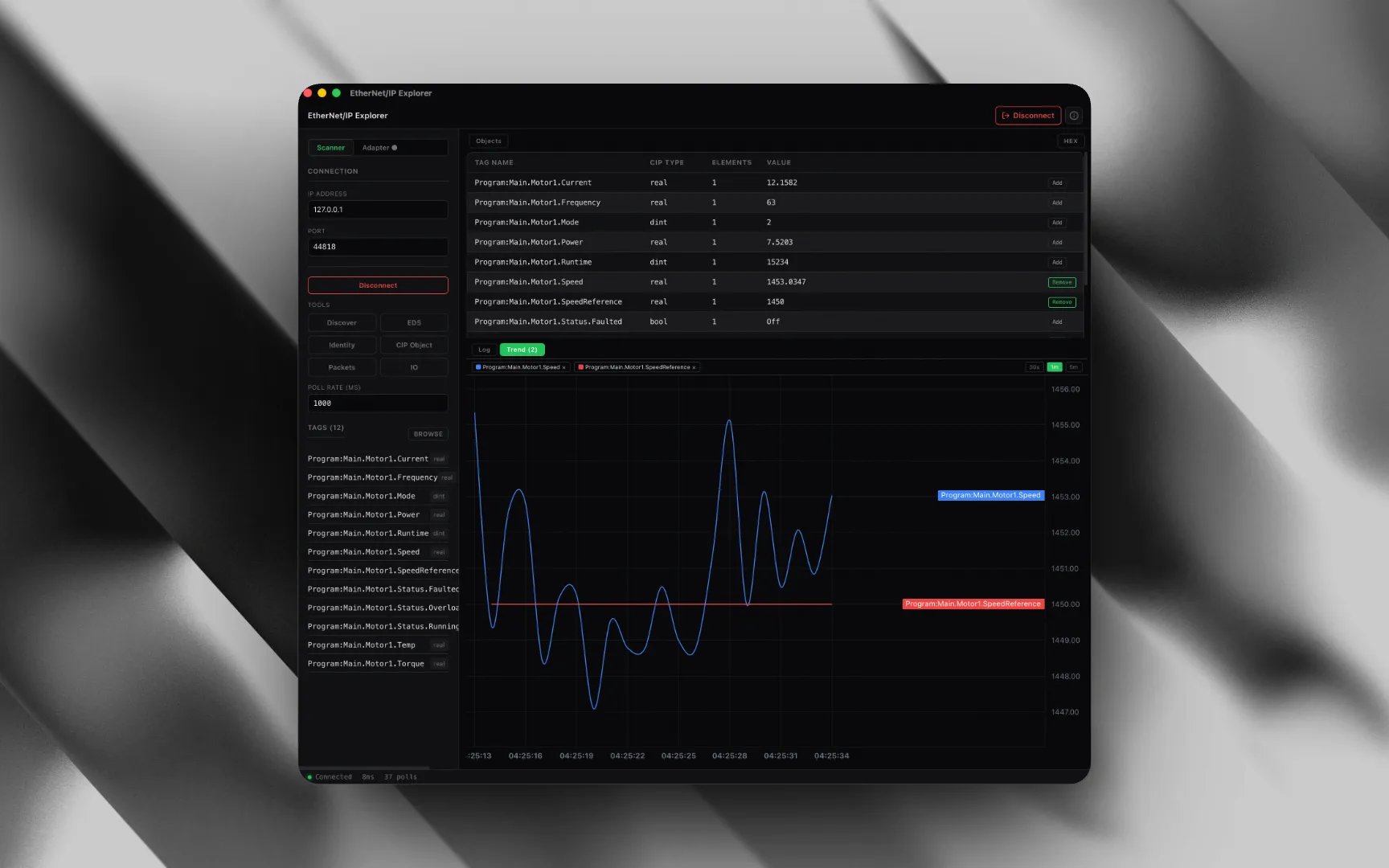
Plot live tag values on real-time line charts with an auto-scaling time axis. Add any tag to the trend, pick a window (30s, 1m, or 5m) and watch cyclic I/O or polled values evolve. The same charting engine powers every MacTools app.
EDS Import
Load a device .eds file to replace raw class/instance/attribute numbers with friendly parameter names like Motor Speed and Output Current. Parses the [Param], [Assembly], and [Enum] sections so the CIP tree reads like a datasheet.
Raw Packet Logger
Capture every EtherNet/IP wire frame (TX and RX) hex-dumped with millisecond timestamps. Expand any frame to inspect the CIP payload, and export the full capture to CSV for the network team. Stop the blame game.
Built-in Adapter Simulator
No PLC on the bench? Start a built-in EtherNet/IP adapter that self-generates realistic tag values: VFD speed, current, torque, and temperature. Point the explorer at 127.0.0.1 and exercise Forward Open, reads, and cyclic I/O against a live device before you ever touch hardware.
03: Compare
How it compares to what you're using now
Every Mac user in industrial automation has been forced into one of these workarounds. Here's how they stack up.
04: Use Cases
Built for field engineers who carry MacBooks.
PLC commissioning, Rockwell integration, drive configuration, network debugging. EtherNet/IP is everywhere, and now you can work with it natively on your Mac.
PLC Commissioning
Browse CIP objects on Allen-Bradley ControlLogix and CompactLogix PLCs. Read tags, verify I/O mapping, and check connection states, all from your MacBook.
Drive Configuration
Read and write parameters on Rockwell PowerFlex and other EtherNet/IP drives. Browse assembly instances to verify motor control data and feedback values.
I/O Module Testing
Test EtherNet/IP I/O modules using implicit messaging. Set up Forward Open connections and monitor cyclic data exchange in real time.
Network Debugging
Device not responding? Capture every CIP packet with timestamps and full decode. Export to CSV and hand it to the network team. Stop the blame game.
Embedded Development
Developing an EtherNet/IP device? Use explicit messaging to test your CIP implementation. Browse your device's object model and verify attribute responses.
System Integration
Verify EtherNet/IP connectivity during system integration. Confirm devices appear on the network, test assembly data exchange, and validate connection parameters before go-live.
05: FAQ
Common questions
macOS Native
Stop paying for Parallels.
Get a native EtherNet/IP Explorer: implicit & explicit included.
Stay Updated
Get notified about new features & device support
We add new CIP features, device profiles, and platform support regularly. No spam: only product updates.
Also from MacTools